Mobile

Mobile

Saturday, October 12, 2013

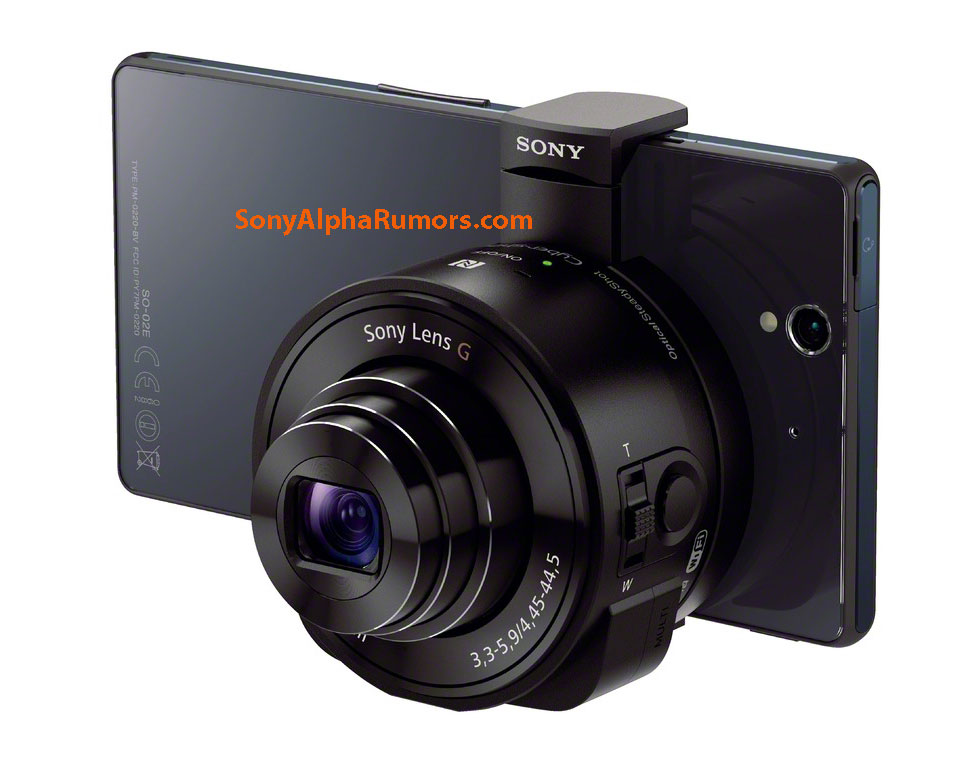
The Sony DSC-QX10 and DSC-QX100 lens camera modules for smart phones

Sony QX10 lens camera modules for smart phones
Sony DSC-QX100_DSC-QX10_lens camera modules for smart phones DSC-QX100_lens camera modules for smart phones
Those are the first leaked images of the rumored Sony DSC-QX10 and DSC-QX100 lens camera modules for smart phones. This new type of product will incorporate lens, sensor, SD card slot Bionz processor into one unit that will connect to your smart phone via Wi-Fi/NFC wireless connection. The camera will be controlled form the phone's LCD screen. This device will work on both Android and iOS based devices. The lens-camera unit will be magnetically attached to the phone:

Sony camera attachment for smart phones
Sony DSC-QX10 and DSC-QX100 specifications: the bigger module will have the RX100MII sensor inside and a Zeiss lens. The second unit will feature a 10x zoom lens with 1/2.3" 18MP CMOS sensor.
The official announcement will most likely be on or around September 4th, 2013.
The leaked pictures also show a new Honami i1 Sony smart phone.
In the next few weeks Sony is also rumored to announce the NEX-5T and the long awaited full frame mirrorless camera.

First press shot of Nokia's Lumia 2520 tablet leaks in cyan blue ahead of 22 October event

article-title
Ahead of Nokia's 22 October media event in Abu Dhabi, EvLeaks has posted what is believed to be the first press shot of Nokia's upcoming tablet. Allegedly dubbed the "Lumia 2520," the tablet is hoping to take the tablet world by storm, offering a Windows RT solution to iPad and Android tablets. No specifications or a release date were accompanied with the image, but it's definitely interesting to see the front of the device before Nokia takes the worldwide stage before Apple on 22 October.
The back of the 10.1-inch tablet has leaked in the past. Several reports have noted the tablet will be competitive in price to Apple's iPad-line. With an ARM-based quad-core CPU and Qualcomm Adreno 330 GPU included, we suspect a Snapdragon 800 processor is at its heart. A 10.1-inch screen that packs a 1371 x 771 resolution that will deliver a meagre 156ppi has been tipped in specification leaks. Further rumoured specs include brightness that's ideal for the outdoors, 10 hours of battery life, LTE, 32GB of storage, a micro HDMI connector and a micro USB port. We're still scratching our heads over a few key details, though.
null
WPCentral reported earlier this week the Lumia 2520 will launch on 17 November on Verizon stateside, in red and black colours. For other carriers worldwide, EvLeaks says the Nokia tablet will be found in white and cyan colours.

HTC One: Gold Edition Smartphone to Be Given as Prize for Best Newcomer Category at MOBO Awards


.

HTC One Gold Edition. Photo Credit: Tumblr/faygomusic
The 2013 MOBO Awards will be held on Saturday, October 19, in Glasgow where one of the five exclusively made HTC One Gold Edition smartphone will be given to the winner of the Best Newcomer Category that the Taiwanese company sponsors.
The HTC One Gold Edition smartphones were crafted in joint venture with Goldgenie founder Laban Roomes and the device features as well the special MOBO 18 logo etched at the back side. The gold smartphone version weighs 4 grams more compared to the normal HTC One device with a value set at £2,750 or approximately US$4400.

HTC One Gold Edition. Photo Credit: AnandTech
"The best artists have always been given gold discs to celebrate their success, but today most people listen to music on their phone. We wanted to celebrate that fact," Phil Blair, the President of HTC Europe, Middle East and Africa, stated.

HTC One Gold Edition. Photo Credit: AnandTech
The HTC President further added: "The award winning HTC One is the gold standard in mobile design and innovation, so it was an obvious choice to make it even more special. We're sure the winning MOBO artist will love their unique phone and we will even be giving a lucky member of the general public the chance to get their hands on one soon too."
"MOBO turning 18 is a huge achievement and a special time for us. The 18ct Gold HTC One phone is a great addition to our coming of age celebrations and helps add MOBO glitz to proceedings!" Kanya King MBE, founder of the MOBO Awards revealed.
The exclusive HTC One Gold Edition smartphone has become striking with the electroplated carat gold, but under the hood, it still boasts with the HTC One features and specs. It has a 4.7-inch Super LCD3 Full HD screen display with 1920x1080p resolution, the speed of a 1.7GHz quad-core Qualcomm Snapdragon 600 processor, 2GB of RAM, the power of a 2300mAh battery, 4MP UltraPixel rear-facing camera with Optical Image Stabilisation (OIS), 2.1MP front-facing camera, support for the 4G LTE network and the availability of non-expandable internal storage capacities of either 32GB or 64GB.

Japanese Telco NTT Docomo Unveils Intelligent Wearable Device To Rival Google Glass

Japanese Telco NTT Docomo Unveils Intelligent Wearable Device that Could Topple Google Glass (Youtube/ Engadget)

"Character recognition technology enables instant language translation for users travelling abroad and reading restaurant menus and other documents," Docomo said in a statement. It debuted the device at the Combined Exhibition of Advanced Technologies (CEATEC) fair, an annual futuristic event in Tokyo.
The augmented reality (AR) Intelligent Glass is patterned after Google Glass, an optical head-mounted display computer device. It displays information in a hands-free format, communicable with the Internet via voice commands
A man controls Google Glass using the touchpad built into the side of the device (Wikimedia)
Apart from menu reading and translation, the augmented reality (AR) Intelligent Glass can make flat surfaces appear into a touchscreen. It is also equipped with technology that allows users to look up somone's identity through facial recognition.

Check Out this incredible BlackBerry Z30 review

DNP BlackBerry Z30 review
Let's be honest: it's not a great time to be BlackBerry right now. Each morning brings yet more news stories that hint -- no, scream -- at the company's rapid unraveling. In the nine days following the announcement of the Z30, the company halted its BBM rollout and announced plans to fire 4,500 employees. Meanwhile, T-Mobile withdrew retail support, Motorola started sniffing around BlackBerry's top talent and its manufacturing partner looked for an exit. Finally, BlackBerry entered into a sale agreement, and the company had to concede that it lost a billion dollars on unsold Z10 handsets. So, what does all of this make the Z30?
There had been plenty of rumors ahead of time that suggested BlackBerry would launch a phablet. The 5-inch Z30, however, isn't big enough to warrant that name, and the company itself has positioned the device as the flagship for the holiday season. That means the handset dodges comparisons with devices like the Galaxy Note, but instead stands in the line of fire between the iPhone 5s, Galaxy S 4, HTC One and Lumia 1020. Unlike those other devices, however, the Z30 isn't packing any flashy, headline-grabbing specs, nor does it offer bleeding-edge internals that will excite performance nuts. There's also the looming question of whether this hardware will make it over to the US in a timely fashion, as BlackBerry has only confirmed that it'll launch in Europe, the Middle East, Africa and the UK (priced at £500 off-contract).
It's almost redundant to ask if this is the device that will save BlackBerry. After all, with the uncertainty surrounding the platform's future, we wouldn't be surprised if corporate buyers waited for the dust to settle before making more orders. Instead, let's ask if this handset, when judged on its own merits, is worth your cash. Is it the first step on a road to rejuvenation, or is the Z30 destined to become a footnote in technology history?

BlackBerry Z30 Review

Hardware

DNP BlackBerry Z30 review
If you were expecting BlackBerry to simply glue on an extra 0.8 inch to the Z10 and knock off early, then you lose a point. While the Z10 had top-and-bottom horizontal bands that demarcated (and protected) the display, nearly the whole of the Z30 is covered in glass. Wisely, the forward-facing webcam, LED light and earpiece have been pushed closer to the edge to make room for that bigger 5-inch screen. At the bottom, you'll find an aluminum chin, which is a single piece of metal that connects to the frame of the device, holding the chassis together. Sandwiched between the chin and the display is the BlackBerry logo, but otherwise, the rounded-off corners and glass covering make it look like a close relative of pretty much every other smartphone released in 2013. Lay this down next to a Galaxy S 4, and you'll find that while there's only a small difference in thickness, the Z30 is 4.1mm taller and 2.2mm wider.
Flip the Z30 over and you'll find the woven carbon fiber back, dominated by the "seven flying D's" logo, which sits in the center. At the top and bottom edges, you'll find speaker grilles (one above, two below), while the primary camera module and flash are in their traditional top-left corner position. The back is removable, and it comes off with the usual nails-down-blackboard snapping and creaking that puts our teeth on edge. What isn't removable, however, is the battery. Much to the dismay of power users and road warriors, the company has decided to seal in the 2,880mAh power pack. That means that the only things you can access are the micro-SIM and microSD card slots, the latter of which is there to complement the 16GB of on-board storage.
BlackBerry Z30
Dimensions 140.7mm x 72mm x 9.4mm (5.53 x 2.83 x 0.37 in)
Weight 5.99 oz. (170 grams)
Screen size 5 inches
Resolution 1,280 x 720 (295 ppi)
Screen type Super AMOLED
Battery 2,880mAh
Internal storage 16GB
External storage microSD (up to 64GB)
Rear camera 8 megapixels, BSI, AF, f/2.2
Forward camera 2 megapixels
Video capture 1080p (rear) 720p (forward)
NFC Yes
Radios Quad-band LTE 3, 7, 8, 20 (800/900/1800/2600)
Quad-band HSPA/UMTS 1, 2, 5/6, 8 (800/850/900/1900/2100)
Quad-band GSM/GPRS/EDGE (850/900/1900)
Bluetooth 4.0
SoC Snapdragon S4 Pro (MSM8960T)
CPU 1.7GHz
RAM 2GB
WiFi Dual-band 802.11a/b/g/n
Wireless charging No
Operating system BlackBerry 10.2
Details correct as of October 2013
Those familiar with BB10 will remember that the software relies upon gestures rather than buttons, so, as with the Z10, there's a dearth of physical inputs here. Going around the frame, you've got the standard sleep/wake toggle and 3.5mm headphone jack on top. Down on the right, you've got the BlackBerry three-way volume rocker, with the central switch letting you activate voice control. The "down" volume button can be used to control the camera shutter, and both "up" and "down" keys can be customized to skip tracks when playing music. Port-wise, both the micro-USB and micro-HDMI-out ports are situated below the halfway point on the left-hand side.
Take this out of the box and the first thing you'll notice is how pleasant this is to hold in the hand. Measuring 72mm wide and 9.4mm thick, it's hardly the thinnest big-screen smartphone on the market, but it's definitely not unwieldy, either. The only caveat we have to add here is that while it's possible to use this device one-handed, a few design decisions make that difficult. For instance, without a dedicated home button, you've got to rely that the sometimes unreliable up-swipe gesture works, or you'll have to shift your hand to hit the sleep/wake button before unlocking the screen, and it's ultimately much easier just to employ the second paw rather than look a fool on the train station platform. We must also discuss build quality, which, as you'd expect from a £500 smartphone, is quite high. Sturdy and without flex, this device is likely to take a heavy pounding and we'd expect it to survive a few drops onto concrete as long as you don't strike the screen directly.
On the connectivity front, you'll find NFC, Bluetooth 4.0 and 802.11a/b/g/n nestled inside. The GSM version we tested was designed for the UK and EMEA, so it packs quad-band LTE on 3, 7, 8 and 20 (800/900/1800/2600), quad-band HSPA+ (800/850/900/1900/2100) and quad-band GSM/EDGE (850/900/1800/1900). Naturally, there's also the usual cadre of accelerometer, magnetometer, proximity sensor and gyroscope, as well as one rather interesting piece of hardware: a Paratek antenna, of which we'll talk about in a little more depth later on.

Display and sound

DNP BlackBerry Z30 review
Let's give credit where it's due: BlackBerry 10 is well-suited to large displays. Whereas the experience was cramped on the Q5 and Q10, the Z10's 4.2-inch screen did a reasonable job. Scale that up a little further, and we now actually find ourselves quite partial to the Z30's 5-inch Super AMOLED display. With a resolution of 1,280 x 720, you wind up with a pixel density of 295 ppi, and while it'd be easy to be snobby and compare it unfavorably to the Galaxy S 4's 441 ppi, this is still a perfectly usable screen. Viewing angles are superb, although, like with the Z10, there's a weird greenish color tint that you'll see if you approach the device from an angle that's nearly side-on.
When reading emails, browsing the web and watching video, the Z30 is perfectly acceptable. That means that we don't have much to say about it either way. Considering its size, you won't suffer through dinner plate-sized pixels, but you will notice that video isn't as clear or un-grainy as it is on other, flashier devices. We've already mentioned the stereo speakers on the back, and while it's a regular gripe that speakers will be obscured in the hand, the Z30's are strong enough for that not to be an issue. In fact, when called upon to provide an impromptu cinema, it was able to entertain four people to a reasonable standard.

Camera

DNP BlackBerry Z30 review
The 8-megapixel sensor that sits on the back of BlackBerry Z30's shell should, in theory, do a quick and nimble job of taking high-quality snaps on the fly. On a clear day, pictures are bright, with vivid colors and lots of detail. Outside of those ideal conditions, however, our images started to look murky. An orange-tinted evening along the Thames produced results with poor depth and the camera struggled to find focus. At night, the results tended to get worse, thanks to the glow of the artificial lighting. In some of the shots, there's enough lens flare to power a small J.J. Abrams movie. We also noticed that unless you're prepared to be patient and set up the "perfect" shot, you'll find the color balance and focusing to be slightly undesirable.

BlackBerry Z30 Sample images

See all photos
36 Photos
We've already praised the HDR mode that BlackBerry introduced with the Q5, and we'll repeat ourselves here. Because BB10 can't take the pictures rapidly enough, HDR is really only usable with still tableaus, and we had to ditch more than a few of our sample images for a shaky hand or a pedestrian ghosting through the frame. On the upside, and when on-form, the images it produced were suitably dramatic and effective, and given your humble narrator's love of a dramatic skyline, we found the Z30's camera to be particularly effective.

BlackBerry Z30 HDR Sample Images

See all photos
38 Photos
It's a similarly fair-weather experience with video: clips filmed on the street and in daylight were of high quality, and the microphone does a good job of masking wind noise. Users have a choice of recording clips at 720p or 1080p with an additional stabilization mode, but we found that the frame-jerking issue we experienced on the Q5 hasn't been resolved. As you can see from the clip, low-light performance isn't great either, although that fuzziness and low contrast mean the videos have a touch of artistic romance. There's also an annoying glitch whereby recorded video clips tack on a few extra frames of white, which makes editing the clips even more of a chore.

Software

DNP BlackBerry Z30 review
The Z30 is the first BlackBerry handset to ship with BlackBerry OS 10.2. Given the company's renewed focus on business customers, it shouldn't come as a surprise to see that the biggest improvements here are aimed at the enterprise set. These include the ability to preview messages on the lock screen, BBM now becoming ubiquitous and the creation of the Priority Hub. In the lock screen, users can glance at the headers of the four most recently received emails, as well as the full text of their last four Twitter messages -- just by pushing the corresponding icon. Meanwhile, Priority Hub is a homegrown version of Google's Priority Inbox, which learns your email habits and selects messages from senders you regularly converse with as "important." You then can access the Priority Hub as one of the options in the hub, next to BBM, Text messages or Facebook missives.
DNP BlackBerry Z30 reviewNow it's time for us to share a small gripe concerning BB10 and its integration with Gmail. While adding our account to the handset was a breeze, using this on a daily basis can be frustrating. Given the near ubiquity of Gmail, you'd think that BlackBerry would have built in some options that we now take for granted. For instance, the lack of a simple archive or delete button means that all BB10 devices are useless for working through your emails unless you fancy pulling a double shift on them later. Perhaps it's a minor issue and we're making more of it, but this is a gripe that we think that you should be aware of, particularly if you or your company uses Google Apps for work mail.
When it comes to BlackBerry App World, "Download the shortcut to the website now" is a depressingly familiar sight. While you can find some ported Android apps now in the store, the lineup is still sparse and there are too many third-party clients like Flix, which charges you £2.50 for a desktop-based workaround to let you watch Netflix on your smartphone. On the upside, BlackBerry 10.2 has been updated to run Jelly Bean-compatible apps, although that will require you to side-load apps that have been converted to the company's .BAR format. If you aren't feeling too confident about your chances, CrackBerry.com maintains an archive of pre-converted titles and numerous tutorials on the subject.

Performance and battery life

DNP BlackBerry Z30 review
Packing a 1.7GHz Snapdragon S4 Pro alongside 2GB of RAM, the BlackBerry Z30 is the most powerful BB10 handset to date. That's not saying much, however, when you realize that plenty of current flagships now use a much more powerful Snapdragon 800 chip. Still, as much as we'd like to put this hardware through its paces, many of the standard benchmarks that Engadget normally uses aren't available for this platform. That means we're relying upon web-based browser tests and our general impressions to assess performance. When we ran it through SunSpider's JavaScript test (v. 1.0.1), the Z30 cranked out a time of 999.4ms (lower numbers are better), making the Z30 the first BB10 device to break the 1,000ms barrier. By comparison, we re-tested updated versions of the Q10 and Q5, and got benchmark scores of 1,473.5ms and 1,772.5ms, respectively. On the downside, that figure still puts it far behind devices like the Moto X (582ms), Xperia Z1 (804ms) and Galaxy S 4 (772ms).
On the bright side, BB10 handles multitasking with aplomb: as many times as we tried to force a slowdown with eight apps all running at once, it rarely stuttered. In the real world, however, there are some issues we need to tell you about. Take, for instance, the moment we wanted to turn the display off to pocket the device while entering a train barrier. Unfortunately, it refused, and even after our furious, panicked pressing, it wouldn't relent. That meant we had to pocket the phone still on to navigate the obstacle. Once we were through, however, it still wouldn't work -- and in fact we had to hold our finger on the power button and threaten a restart before we could coax it back to life.
Then there was the time we switched from taking HDR images to normal mode, which prompted the phone to reboot itself. Another time, we tried to make a call, and the display refused to respond to our touches until we had, again, restarted the device. During a photo session, we were taking some sample images with the camera, and then put the phone down. When we resumed a few minutes later, the error message "The camera can't be started" greeted us. Naturally, all devices suffer the odd glitch or brownout, but when these things happen regularly during a single week of testing, we suspect that unless the company deals with the issue -- and fast -- plenty of people will be beating a path to return their phones to the store. Now, BlackBerry promises that our performance woes are unusual, and that we'll receive a fresh unit to continue our testing -- so if we find anything different, we'll update you here.
One thing that BlackBerry, for all of its innovations, hasn't really improved upon here is its boot-up times. Yes, we know -- few of you even care how long it'll take for your phone to start from cold on those rare moments when you turn it off, but considering the lack of a removable battery, it may be something you quickly grow to care about. The boot-up clocks in at a minute flat, making it noticeably slower than other handsets.
One of the most interesting things about this handset is that it contains a Paratek antenna. BlackBerry (or RIM, as it was called back in 2012) bought Paratek Adaptive RF (also known as Paratek Microwave Inc.) on the promise that the latter's cellular gear could work miracles. In short, Paratek's antenna is designed to boost data transmission rates in areas with low signal, which should hopefully prevent dropped calls and speed up your downloads -- theoretically saving battery life. Another by-product of the system is that it can apparently avoid "death grip" problems by tuning the antennas to constantly find the best signal. So, we went hunting for areas where network performance suffered to see if the Z30 could do better than the other devices we regularly use for testing. Unfortunately, the answer is no. At least in our limited, real-world tests, we found no meaningful difference between the Z30 and offerings from Apple, Nokia and Samsung.
One of our biggest gripes with the Q5 was that call quality wasn't great; the audio was full of clicks, hisses and compression that'll annoy you if you're used to HD Voice calling. The experience was roughly the same here, with dropouts and the odd digital artifact that made conversations sound worse than an old-school satellite phone call on broadcast news. Data-wise, thanks to the lack of LTE across much of the UK, we weren't able to test the Z30's performance on bands 3, 7, 8 and 20, but found that it gobbled down data on Three UK's HSPA+ network as rapidly as on our other devices.
BlackBerry promises that this smartphone will give you 25 hours of battery life with "mixed usage," a euphemism we take to mean that it should last a day between charges. In our standard video rundown test, with the display set at 50 percent, WiFi on (but not connected) and social networks set to poll at regular intervals, the Z30 was able to crank out 12 hours and 58 minutes. Day-to-day, we charged the device up overnight and then used it through until bedtime without ever seeing the charge icon fall past the halfway mark. As such, we'd suggest that most users can leave the spare external battery at home unless they're going somewhere remote.

The competition

DNP BlackBerry Z30 review
When Engadget reviewed the Q5, some of our readers felt that comparing that handset to similarly priced devices from other companies was unfair. This was because we weren't taking into account the enhanced security and enterprise-level features that BlackBerry offers on its handsets. However, a very recent InfoWorld study found that BB10 and iOS were comparable in terms of the security they offer, and that Samsung and Motorola Android devices were similarly secure, aside from the greater risk from malware. Considering that Samsung's Knox-enabled devices were given the same level of approval from the US Department of Defense, we do indeed feel comfortable comparing the Z30 to flagships from Samsung; not to mention Apple, Motorola and Nokia too.
It's worth mentioning that the Z30 will be launching first in the UK and Middle East (two of BlackBerry's traditional strongholds), with no word on a US or Canadian debut (Update: Rogers has committed to carry the Z30). In real terms, that means you've either got to import it, or choose another BlackBerry 10 device. The company has admitted that there are only going to be four devices available between now and the start of 2014, with the Z10 (£300/$450), Q10 (£500/$550) and Q5 (£300/$360) rounding out the quartet.
If, however, you're merely in the market for any smartphone, then you can also try the 5-inch Galaxy S 4 ($600/£400), the 4.7-inch HTC One ($600/£500) and the 4.7-inch Moto X (in the US, the Developer Edition is available for $600). For the reasons of balance, it's also worth mentioning that the iPhone 5s ($650/£550), which runs iOS, and the Lumia 1020 ($800/£600), which runs Windows Phone 8, are also fine alternatives.

Wrap-up

DNP BlackBerry Z30 review
The BlackBerry Z30 has plenty of things going in its favor. It's well-designed, isn't cumbersome to hold and, despite its size, looks really stylish. Moreover, BlackBerry 10 is well-suited to a bigger display and the 5-incher here is a good one. So had the Z30 been the first BB10 device launched back in January, perhaps there would have been room for more optimism. We're always full of praise for devices with a strong battery and, while BlackBerry diehards will be annoyed that the cell isn't removable, a 13-hour intensive stint still means it should last for a full day of work or keep you entertained on a long-haul flight. However, we can't be universal in our praise because there are so many small things that add up to a frustrating experience. The constant crashes, middle-of-the-road camera and poor call quality erase much of the goodwill the handset has otherwise earned.
On one hand, the BlackBerry Z30 is the best BlackBerry 10 device yet, and if you're already a convert, this is the one we'd recommend. If you aren't a BlackBerry fan, however, then the situation's a little more nuanced. If you're looking to dump your Android, iOS or Windows Phone device in favor of the Z30, you have to ask yourself: Will you buy a device that really needs some urgent stability fixes -- not to mention the issues we've mentioned above? While we expect the Z30 to be cheaper in other territories, the £500 ($800) UK off-contract price will be another bitter pill for those looking to switch. The Z30 isn't a bad device by any means, just one that falls short of what we expect from a 2013-2014 flagship.

Incredible!!! Mad Catz M.O.J.O. Android console will stream PC games to your TV

Mad Catz MOJO Android console will stream PC games to your TV, software update to arrive postlaunch
When Mad Catz made pre-orders for its M.O.J.O. Android gaming console live, it did so with a curious bit about support for PC streaming. But any mention was quickly removed from the site and, when contacted for comment, the company remained silent. Now, however, Mad Catz has confirmed to Engadget that, yes, the M.O.J.O. will allow users to stream PC games to their TVs and the ability will be enabled via a software update "available shortly after launch." We've also received final specs for the micro-console which you can find after the break, although it all falls in line with what's been reported previously, so don't expect any new revelations. Does the addition of PC streaming -- a feature included in NVIDIA's Shield and planned for Valve's planned Steam Machines -- make the $250 M.O.J.O. a more attractive holiday purchase? Feel free to sound off in the comments below.
Mad Catz M.O.J.O
• Nvidia Tegra 4 T40S 1.8GHz processor
• 2GB RAM
• 16GB Internal Storage
• 1 x USB 2.0 port
• 1 x USB 3.0 port
• 1 x HDMI out (Supports 720p and 1080p resolutions)
• 1 x power input
• 1 x 100 Mbit Ethernet socket
• 1 x 3.5mm headphone socket
• Micro SD flash slot supporting SDXC format SD cards (at least 128GB support)
• Wi-Fi a/b/g/n support
• Bluetooth 4.0
• Android 4.2.2 operating system
• 5V 3A AC adapter with 1.5m lead and multi-region attachments
• C.T.R.L.R
• 1.5m HDMI to HDMI lead included
• Fully GMS-certified
Dimensions: 130mm x 114mm x 50mm
C.T.R.L.R
Mobile Gamepad Specifications
• Full standard gamepad configuration:
Next Generation Mobile Gamepad included
• Bluetooth Smart technology linked with micro USB dongle
• Phone clip – allows easy mounting of your Bluetooth Smart-compatible Android device to
the C.T.R.L.R
o Four face buttons (A, B, X, Y)
o Two shoulder buttons (L1, R1)
o Two analog triggers (L2, R2)
o Two stick buttons (LSB, RSB)
o Start and Back buttons
o Home button
o Two analog sticks
o Ultra low latency of 7ms
o Low power consumption resulting in more than 50 hours of battery life from two x
AAA alkaline cells
for mobile gaming away from M.O.J.O.
Dimensions: 150mm x 110mm x 50mm

check out Samsung ATIV Book 9 Plus in this full review

Samsung ATIV Book 9 Plus review
When Samsung first released the Series 9 in 2011, it quickly became one of our favorite laptops of the year. Then, once Intel threw its marketing weight behind Ultrabooks, it became our favorite Ultra. But the Series 9 was born in the Windows 7 era, and it became harder and harder to recommend as touchscreens became the standard. Now, though, we have the ATIV Book 9 Plus, the first truly flagship-level Ultrabook Samsung has released since Windows 8 came out.
As you'd expect, it trades in the Series 9's matte, anti-glare display for a touchscreen. What's more, though, Samsung also cranked up the resolution, retiring that old 1,600 x 900 panel in favor of a 3,200 x 1,800 one. And, of course, it steps up to a newer Haswell processor, which promises not just faster performance, but also longer battery life (not that endurance was a problem on the original). So is it still our favorite Ultrabook? Pretty much.

Samsung ATIV Book 9 Plus review

See all photos
19 Photos

Look and feel

Samsung ATIV Book 9 Plus review
We've met Samsung's laptop design team. It's led by some lovely, humble people, but we suspect that deep down, they know the same thing we know: that last year's Series 9 Ultrabook was a near-perfect product. So, content to let perfect dogs lie, the company more or less kept the same blueprint when it sat down to design this year's ATIV Book 9 Plus. This time around, it measures 0.54 inch thick, making it only a hair thicker than last year's model, which measured 0.5 inch (and which didn't have a touchscreen, we might add).
It also has generally the same shape, with a profile that tapers drastically toward the front, but widens near the hinge to make room for the various ports (two USB 3.0, micro-HDMI, mini-VGA, a headphone jack and a hidden SD slot). In the box, you'll find an Ethernet adapter as well. The machine is also comfortable to hold, and we're not even referring to the weight (more on that in a moment). Though the edges here look sharp, they're actually quite blunt, so it won't hurt to press your palms into them when you're carrying this thing with two hands.
The overall build quality is the same too. Like its predecessor, the ATIV Book 9 Plus is made of smooth aluminum, except the color, billed as "Mineral Ash Black," has a slightly bluish tint in some light, whereas last year's was a plain black affair. Between that and the subtle flourishes (a thin metal band around the trackpad, just one button on the keyboard deck), the entire machine has an understated, but still expensive feel to it. The only problem is -- and we complained about this last year -- is that despite having a matte finish, the aluminum picks up fingerprints quickly. Make sure to have a cloth in your desk drawer so that you can give the machine a rubdown every once in a while.
Samsung ATIV Book 9 Plus review
All told, almost everything that feels different about the ATIV Book 9 Plus has to do with the addition of that touchscreen. There's the glossy screen, of course, which used to have a matte, anti-glare finish. And of course, there's the weight. Without a touchscreen, the old Series 9 weighed 2.55 pounds -- an astonishing spec, even for an Ultrabook. Thanks largely to the touchscreen, though, this new model comes in at 3.06 pounds. Now, before we get carried away, even that's pretty respectable for a touchscreen, 13-inch Ultrabook. But it does feel a lot heavier than we remember the Series 9 feeling. And besides, there are plenty of touchscreen ultraportables that manage to be even lighter than this.
There's one other change, and this one we can't blame on the touchscreen. In addition to adding its new SideSync software to Windows 8, Samsung slapped some conspicuous "SideSync" and "HomeSync Lite" branding on the device itself, over on the right side of the palm rest. What's annoying is that it's painted onto the aluminum, so it's there, staring back at you whether you like it or not. We would have much preferred a sticker we could peel off.

Keyboard and trackpad

Samsung ATIV Book 9 Plus review
Just like the rest of the design, the keyboard is basically the same as on the last-gen Series 9. Once again, the buttons are well-spaced, with a pretty aquamarine backlight glowing from underneath. Be warned, though: they're also flat and shallow, with minimal travel. Don't get us wrong; they're still reasonably easy to type on, but we did suffer more dropped letters than on some other Ultrabooks we've tested recently. Type too quickly and you might have to go bak back and re-type a letter that didn't register the first time around.
One of the first things we noticed when we initially unboxed the ATIV Book 9 Plus is that the trackpad is much more reliable than the one we tested on the Series 9. The cursor actually went where it was supposed to, and multi-touch gestures like two-finger scrolls and pinch-to-zoom were also easy to pull off. After a little more time with the machine, we did notice that the pad has a bit more friction than we'd like. To the machine's credit, the cursor never went rogue and ended up on some random, unintended part of the page; we did suffer a bit of drag, though. There were also a few times when the trackpad mistook two-finger scrolls for a swipe in from the left, which caused us to inadvertently switch from one app to another. That was definitely more annoying than the slightly stubborn cursor.

Display and sound

Samsung ATIV Book 9 Plus review
Even if you decided to downgrade the resolution to 1080p, you'd be left with a fantastic screen.
Adding a touchscreen to the Series 9 was clearly something of a compromise for Samsung: not only did it add noticeably to the weight, but it also meant Sammy had to move from a matte, anti-glare screen to a glossy one. Still, if you're under the impression Samsung swapped in a pedestrian display, we'll correct you now. With this generation, the company made 3,200 x 1,800 resolution standard -- a dramatic improvement over last year's model, which topped out at 1,600 x 900. We won't waste your time describing how it's noticeably sharper than the original, but we will add that it looks even sharper than a typical 1080p screen; yes, your eyes can probably tell the difference.
That increased acuity works great for certain desktop apps, like Word, and it also brings out the best in the colorful Windows Start Screen. That said, we'll make the same caveat we make any other time we review a laptop with a super-high-res screen: not all content has been optimized to look good on displays this sharp. With YouTube, for instance, videos look strange at full-screen, with the scrubber and buttons at the bottom all scaled way down. The effect is so terrible, it's funny.
Even if you decided to downgrade to 1080p, though, you'd be left with a fantastic screen. Though it's naturally more reflective than the matte panel that shipped on last year's model, there really are very few light artifacts here. At half-brightness, I could barely see my reflection in the screen while I typed; at full brightness, I couldn't see it at all. Speaking of the sort, the 350-nit brightness rating helps contribute to some great viewing angles from the side -- with the brightness turned all the way up, you should have no problem crowding around the laptop and watching a movie from slightly off to the side. What's nice is that the vertical viewing angles are great even at lower brightness settings. So, even if you're working on an airplane and want to conserve battery life by dimming the backlight, you'll still enjoy good contrast with the lid dipped forward.
Samsung ATIV Book 9 Plus review
We honestly weren't expecting much in terms of sound: most Ultrabooks deliver tolerable quality at best and besides, Samsung hasn't exactly been making a big deal of the ATIV Book 9 Plus' audio chops. That may have been a mistake, though: the sound here is not just surprisingly loud, but surprisingly rich too. Most of the time, we had the volume set well below the median mark -- maybe at level 30 or 40 out of 100. What's more, the volume stays loud even when you place the laptop on a soft surface like a couch or a bed; the speakers' placement on the bottom side doesn't muffle sound as we feared it would. Really, the only reason we avoided the top setting is that it makes for an uncomfortably loud system when it's just you chilling by yourself in the home office. If you do crank the volume all the way up, though, you'll only have to suffer a minimal amount of distortion.
At lower volumes, it's even better -- dare I say, the best sound I've heard yet on an Ultrabook. Over an afternoon of listening to Eric Clapton, Jeff Beck, Simon and Garfunkel, Dusty Springfield, The Temptations and others, I often felt as if I were rediscovering my favorite songs; piano notes and drum beats pushed through the dual two-watt speakers more forcefully than I'm used to on other machines. In fact -- and no, I'm not trying to troll here -- I didn't want to go back to my MacBook Air for music-listening after trying out the speakers here.

Performance and battery life


PCMark7 3DMark06 3DMark11 ATTO (top disk speeds)
Samsung ATIV Book 9 Plus (1.6GHz Core i5-4200U, Intel HD 4400) 4,973 5,611
E1,675 / P867 / X277
547 MB/s (reads); 508 MB/s (writes)
Acer Aspire S7-392 (1.6GHz Intel Core i5-4200U, Intel HD 4400) 5,108 5,158
E1,724 / P952 / X298
975 MB/s (reads); 1.1GB/s (writes)
Sony VAIO Pro 13 (1.6GHz Intel Core i5-4200U, Intel HD 4400) 4,502 4,413
E1,177 / P636 / X203
1.04 GB/s (reads); 479 MB/s (writes)
Sony VAIO Duo 13 (1.6GHz Core i5-4200U, Intel HD 4400) 4,440 6,047
E1,853 / P975 / X297
546 MB/s (reads); 139 MB/s (writes)
Sony VAIO Pro 11 (1.8GHz Core i7-4500U, Intel HD 4400) 4,634 N/A
E1,067 / P600 / X183
558 MB/s (reads); 255 MB/s (writes)
Dell XPS 12 (1.7GHz Core i5-3317U, Intel HD 4000) 4,673 4,520 N/A 516 MB/s (reads); 263 MB/s (writes)
The ATIV Book 9 Plus is available in just one configuration, and it rocks generally the same components as other Ultrabooks we've tested recently: a dual-core, Haswell-series Intel Core i5-4200U processor clocked at 1.6GHz, 4GB of RAM and a 128GB SSD. Accordingly, then, its benchmark scores land in the same ballpark as other machines with the same processor, including the Sony VAIO Pro 13, and the new Acer Aspire S7-392.
The one area where the ATIV Book 9 Plus falls short is in I/O speeds. All told, the Toshiba-made SSD (you read that right) notched average reads of 547 MB/s, with writes hovering around 508 MB/s. To be clear, we're not saying those speeds are slow. It's just that we've recently tested a string of machines that managed to hit or exceed speeds of 1GB per second, even on the write test, which is always harder. (Note: the Acer Aspire S7 has a RAID 0 setup, which has tradeoffs of its own, so we'll concede that's not a totally fair comparison.) At any rate, as we said, these speeds would have once been very impressive, but we can no longer say the Series 9 is a leader in this area. Which is surprising, since Samsung makes some of the fastest SSDs on the market. Maybe the company should have stuck to its own components here?
That said, the machine feels plenty fast in real-world use. Not only did I write my review on this laptop, but I wasted plenty of time on it too, keeping open tabs for Gmail, YouTube, Pandora and lots and lots of web searches. Switching from one app to another was easy, as was toggling between all those open tabs in Internet Explorer. At first, we thought the machine was in danger of overheating, as the bottom side and upper keyboard area got warm just six minutes into a YouTube video. The good news is that though it gets warm quickly, it doesn't get any hotter after that. Even after hours of use, complete with non-stop media streaming, the bottom stayed fairly lukewarm -- definitely cool enough to comfortably rest on my lap.
It's a similar story with fan noise. The ATIV Book 9 Plus pipes up quickly -- heck, it sometimes makes noise when it's sitting idle. But that noise never rises above a quiet sigh. In fact, we didn't even notice it until we paused Pandora and started to work without any background noise.

Battery life
Samsung ATIV Book 9 Plus 8:44
MacBook Air (13-inch, 2013) 12:51
Sony VAIO Duo 13 9:40
Sony VAIO Pro 13 8:24
Acer Aspire S7-392 7:33
Acer Iconia W700 7:13
Sony VAIO Pro 11 6:41
Dell XPS 14 6:18
Lenovo IdeaPad Yoga 13 5:32
Dell XPS 12 (2012) 5:30
ASUS Zenbook Prime UX31A Touch 5:15
Toshiba Kirabook 5:12
Toshiba Satellite U925t 5:10
Lenovo ThinkPad Helix 5:07 (tablet only) / 7:24 (with dock)
Lenovo ThinkPad X1 Carbon 5:07
Samsung ATIV Book 7 5:02
ASUS Transformer Book 5:01 (tablet only)
Lenovo ThinkPad X1 Carbon Touch 5:00
MSI Slidebook S20 4:34
Acer Aspire P3 4:33
Acer Aspire S7-391 4:18
ASUS TAICHI 21 3:54
Microsoft Surface Pro 3:46
Normally, when a company rates a laptop for a certain amount of battery life, we just assume we'll get a bit less runtime, especially since our tests involve taxing conditions (WiFi on, brightness at 65 percent, video looping off the local disk). In this case, though, Samsung seems to have given a conservative estimate: though it promises up to 7.5 hours of use, we actually managed eight hours and 44 minutes in our video rundown. As you'll see in the table above, that's a respectable showing for a Haswell machine. In fact, the Sony VAIO Pro 13 was only 20 minutes off in the same test.

Software and warranty

Samsung ATIV Book 9 Plus review
For all the apps it loads onto its new Galaxy phones, Samsung actually went easy with the bloatware on the ATIV Book 9 Plus. Here, we've got Bitcasa cloud storage, iHeartRadio, Netflix, a trial of Norton Internet Security and Adobe Photoshop Elements 11. As for Samsung apps, it's just S Player+, SPhotoStudio and Music Hub, all of which are basically exactly what they sound like.
HomeSync Lite lets you download and upload content between your PC and mobile devices. In total, you can add up to five user accounts, with six devices per user. The catch, though, is that you'll need the Samsung Link app installed on your phone and, uh, it's only available on Samsung handsets. So if you're using a Moto X, you can keep on trucking to the next section. Also -- and maybe this goes without saying -- you need to refrain from deleting HomeSync from your computer, even if it looks like bloatware; without the app installed on your PC, you can't use the service on your mobile devices either. SideSync, meanwhile, is for transferring files between your PC and Samsung phone, which you can do using either a cable or over a wireless connection.
The ATIV Book 9 Plus comes with a one-year warranty.

Configuration options and the competition

To reiterate: the ATIV Book 9 Plus is sold in just one configuration in the US: a $1,400 model with a 1.6GHz Core i5-4200U processor, 4GB of RAM, integrated Intel HD 4400 graphics, a 3,200 x 1,800 screen and a 128GB SSD.
As you've probably gathered by now, we're rather fond of the ATIV Book 9 Plus, and would highly recommend it to anyone shopping around for a premium Ultrabook. That said, it's not the only excellent option out there. Below, you'll find a rundown of the competition. There's a lot to cover, so to keep things simple, we'll go in alphabetical order:
  • We've already mentioned the Acer Aspire S7 several times in this review. As the successor to the original S7, which came out last year, this new model steps up to Haswell processors and a larger battery capacity, leading to a serious improvement in runtime. Even then, it doesn't last quite as long as the ATIV Book 9 Plus in our tests, but its endurance (7.5 hours) is still more than acceptable. At 2.87 pounds, it's one of the lightest touchscreen, 13-inch Ultrabooks we know of, and it rivals the ATIV Book 9 Plus in thinness too. Its screen is lower-res, at 1080p, but in terms of overall quality (viewing angles, colors, et cetera) it's one of the best we've seen.
  • Longtime Windows users won't give Apple's MacBook Air a second look, but it's worth calling out for folks who are OS-agnostic. With this year's refresh, Apple mainly just swapped in Haswell processors and PCIe SSDs, with no changes to the exterior. That's not a bad thing, per se -- we still dig the unibody aluminum chassis and comfortable keyboard -- but the resolution is still stuck at 1,440 x 900 on the 13-inch version. The only thing excusing the mediocre screen is the battery life, which topped out at nearly 13 hours in our video rundown, with the next-best performer trailing hours behind.
  • It's not out yet, but ASUS' Zenbook UX301 is worth adding to your shortlist. With a 2,560 x 1,440 screen, it's one of a few Ultrabooks to push the envelope beyond 1080p -- and that list gets even shorter if you include only machines that are based on Haswell. In addition to the stunning IPS screen, the UX301 has a durable (and also beautiful) Gorilla Glass 3 lid. Thanks in part to that glass armor, the machine will weigh almost as much as the ATIV Book 9 Plus (3.04 pounds, to be exact). In exchange for the "heft," though, you at least get some promising performance: a Core i7 CPU, paired with optional discrete NVIDIA graphics.
  • We already liked the Dell XPS 12 for its sturdy build quality, attractive design and comfortable keyboard, and now it's even better: Dell recently refreshed it with Haswell CPUs, a bigger battery and an NFC sensor. The screen resolution is still the same, at 1,920 x 1,080, but then again, so is the price: at $1,200 with a 128GB SSD, it's a tad cheaper than other systems carrying similar specs.
  • Here's another one you might want to wait on. The Lenovo Yoga 2 Pro is the successor to the original Yoga 13, and in addition to being both thinner and lighter, it brings a much-sharper 3,200 x 1,800, 350-nit screen -- yep, just like on the ATIV Book 9 Plus. And at 3.06 pounds, it weighs the same as Samsung's offering too. And, as with the ASUS UX301, though, it's likely to be more configurable. Most importantly, however, the starting price is $1,100, which is considerably less expensive than what the Samsungs and Acers of the marketplace are selling.
  • Though we only did a full review of the 11-inch Sony VAIO Pro 11, we did spend some time benchmarking the 13-inch version, the Sony VAIO Pro 13 (see its results in the benchmark table in the performance section further up the page). With Haswell processors and PCIe SSDs, it manages to offer long battery life and transfer speeds in excess of 1GB per second. And, in the grand tradition of Sony's earlier Z-series laptops, it has a carbon fiber build that allows it to be remarkably lightweight -- just 2.34 pounds in this case. That's easily the lightest 13-inch touchscreen laptop on the market (maybe even the lightest 13-inch Ultrabook, period).
  • We're mainly including the Toshiba Kirabook on this list so that you know to stay away. With a 2,560 x 1,440 screen, the Kirabook was one of the first Ultrabooks to ship with something better than a 1080p screen. Still, Toshiba made the mistake of releasing it before Haswell came out, and to this day, it's stuck with last-gen Ivy Bridge processors. That's a real shame, given the lofty $1,600 starting price, and you're going to miss out on battery life because of it too. Oh, and adding insult to injury, that starting price doesn't even include a touchscreen. As if!

Wrap-up

Samsung ATIV Book 9 Plus review
Samsung already had the best Ultrabook on the market, and it's managed to stay on top in 2013, even as its competitors have improved battery life and performance on their own models. Like its predecessor, the ATIV Book 9 Plus is impressively thin, with an understated design and sturdy build quality. And thanks to a sharp 3,200 x 1,800, low-glare screen and a current Haswell processor, it rises to the top in terms of both display quality and performance. Even the battery life, which isn't technically best in class, is still very good. It's a solid enough package that we can forgive its few flaws (the painted-on branding and the comparatively slow disk speeds). So, while there are some other excellent, similarly priced options out there, the ATIV Book 9 Plus is a fantastic option in its own right.